We are living in a world where total surveillance became a reality.
Yet, sometimes you are interested in keeping secrets.
Unfortunately there is a variety of ways to listen to your phone conversations and read all of your SMS.
Of course there are several ways of protection against wiretapping.
However, there is one special thing about it.
In about 85% of cases intruders still manage to get the information, despite the protective measures.
Why is this happening?
The main reason – wrong protection choice.
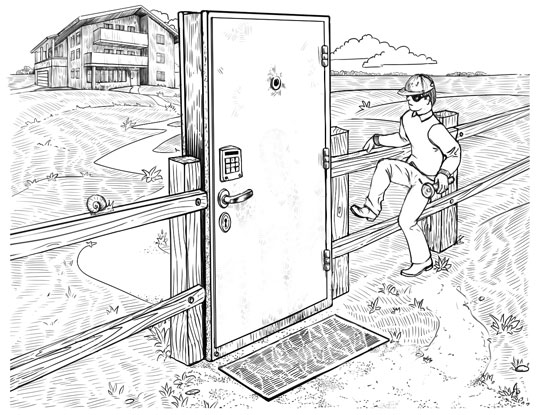
That is, the protection was inadequate to the capabilities of the other side.
Let’s see what options there are to protect your conversations.
1) The first group of solutions – is a solution that, in fact, does not protect, but gives a “false sense of protection.”
These include methods such as having a second phone, which is only used for secret conversations or changing SIM cards.
Why do these solutions do not help? In fact, having a second phone may solve the problem, if you need to protect yourself on a basic level.
However, if a professional is hired to spy on you with so called advanced wiretapping (for example, a car with special equipment parked close by), then switching the phone will not help.
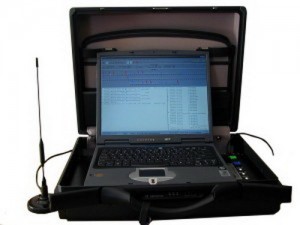
The same applies to changing SIM cards. It does not matter what SIM card you are using at the moment – if your conversation has been tapped all conversations are recorded in a certain radius.
And then the needed conversation is easily chosen. Not to mention that wiretapping is usually tied to both the phone number and the serial number of the phone.
2) The second group – these are more professional solutions.
For example, using a scrambler.

Such devices look very impressive – using a scrambler your voice is converted into noise and then transmitted over the communication channel. On the other side a similar device transforms it back to speech.
Unfortunately, most of these solutions do not use encryption at all (often it is written in plain text “encoded” in the device description). Usually scramblers use frequency conversion or temporal transformation.
In addition, the design of these devices is well known and to decode the recording is fairly simple.
Normally after the “encoded” conversation has been recorded the decoding starts immediately.
In the case of an “unusual” scrambler, it takes a professionals half an hour to one day to create a simple script that will decrypt all of your future conversations (or rather everyone’s who uses a similar device).
From Wikipedia: Electronic kits for scrambling and descrambling are available from hobbyist suppliers. Scanner enthusiasts often use them to listen in to scrambled communications at car races and some public service transmissions. It is also common in FRS radios. This is an easy way to learn about scrambling.
3) The next option – variety of popular instant messengers, some of whom promise confidentiality.
Sadly large communication services cannot be secure by definition. Simply due to the telecommunications laws in most countries in which they operate.
All providers of communication services are obligated to record and store (at least 6 months) all conversations and correspondences.
And when secret services decide to acquire them, believe me, they won’t have any problems getting their hands on the needed information (in worst case scenario, the messengers themselves will get in trouble).
Occasionally “rebels” appear on the market – messengers, declaring non-cooperation with the secret services. And at the beginning (while they are gaining popularity) it is most likely true.
Unfortunately, we never know at what point they will change their position (it is unlikely that they will report this to their users). It usually happens in exchange for opportunity to develop their business further by cooperating with secret services of specific counties.
If you think this will never happens with exactly that messenger, just recall how Skype was introduced by the group of enthusiasts, than sold, then sold back, than sold again and finally appeared in the hands of the Microsoft.
4) One possible solution could be the use of special crypto-phones.
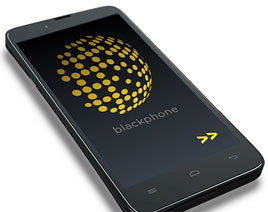
This is very easy – just buy the phone and you can easily discuss sensitive topics.
But it has its drawbacks:
- at the time of registration, the mobile operator learns what type of phone you have, hence it becomes clear that you have something to hide, since you are using special equipment to encrypt conversations.
- purely visual, the phone looks different from usual models and if someone sees it in your hands unnecessary questions might arise.
- sadly there were instances when during shipping of such phones special “add-ons” were installed that allowed conversation monitoring – are you absolutely sure that your local supplier is exclusive and independent from the secret services?
- even if you trust your supplier, there are still customs and logistics that are hard to control – often “a little discreet upgrade” of equipment occurs at this very stage.
5) Another option – use of specialized cloud services (or any 3rd party services)
In this case, you download and install special software that encrypts your conversations.
Many different products can be found on the market that differ greatly in quality and price.
There is a large number of absolutely “phony” solutions that either do not use encryption correctly (despite the fact that they claim to do so) or do it in such a way that you cannot really call it a solution.
Still, high-quality products do exist and are offered by serious companies that are experts in the security field.
But in order to distinguish the first from the second, one needs to be “aware” and have experts on their team.
But even if you choose a solution from a trustworthy company, there is still one bad thing on it. All your calls are initiated through the solution provider’s server. Hence the question of trust arises again.
And it’s pretty clear that if a secret service of a country, where this company operates, all of a sudden becomes interested in one of their clients; the company has no legal way to refuse to cooperate.
To find out that you are a client is easy, since your phone will handle a connection to their server (which, of course the secret service knows about).
What if the company’s servers are located in a different country, then the provider can be under control of that country’s secret services as well.
In addition, the technical staff have access to the data center, they can easy be approached and persuaded 🙂

In a nutshell, the main weakness of all the listed solutions:
the system’s security is NOT under your control.
So, does this mean there is no solution that will provide guaranteed security?
In fact, there is one.
We operate on the encryption market for 15 years and we know all weaknesses of the existing protection systems.
That’s why, from the very beginning our services are based on a key principle:
We provide a solution that is completely under the customer’s control.
Let us show you how it works.
1. The system is deployed at customer’s premises.
You buy or rent a regular server and place it in an undisclosed data center. You deploy our platform using our detailed instructions. Then install a specific software on the mobile devices that will encrypt specific conversations.
As a result you get a fully personal anonymous protection of your conversations and SMS.
If compared with cloud-based solutions, in our case it would be hard even to understand that you are using an encrypted call solution. Since your phone will not be connected with a 3rd party communication server, rather to your own server.
This is the principal difference – the entire solution is in the customer’s hands and not in the providers.
2. For every customer we create and individual solution, as practice shows each solution is different for every customer.
For example, in past projects that we did for several government organizations; we had to install our solution into their already complex system with a hierarchical subordinate structure, as well as organize key management in the same way.
In other cases, for a number of international corporations we had to link our solution to their highly distributive structure in which there were hundreds of offices and branches. While the entire network works within their own Intranet, a complex system of regional and global servers.
On the contrary for some other companies, the solution had to be deployed on a particular server under their control, and the key management system to be as simple as possible.
As you can see, we have experience in solving cases with virtually any complexity.
3. Our system – is the only one on the market that provided services at a government encryption level.
Many claim that they can encrypt packages using AES 256 at the TOP SECRET level. But very often it’s actually AES 128 or even lower.
Why does this happen and how can we guarantee AES 256 explains below under “Functionality and main principles”.
4. We often have to work with integrators that use our solution as part of their own system.
In this case we do full localization, train specialists and integrate our solution into their development. As a result, what they get is their own product that can be sold using their own brand.
5. Often the client wants our solution not only for their mobile, but also for their landline phones. Therefore, we have developed a special solution for this type of communication (it is popular among state-owned companies).
Functionality and main principles
Now let’s look at the functionality and basic principles on which our solution is built in comparison with competitors.
Our solution runs on standard mobile devices
The solution runs on standard smartphones (iOS, Android), which allows you to install the solution independently and eliminates tracking at the purchasing \ delivery stages.
| Our solution – standard iOS/Android device | Others – special phone |
|
|
Usage of standard servers
Our solutions work on standard servers, easy to buy or rent. All servers can be locally located or can be located in undisclosed data center.
| Our solution – standard server | Others – special server |
|
|
Works with all available networks
Our solution works great with new age networks such as 3G, 4G and in offices(Wi-Fi), as well as with older networks(2.5G, EDGE).
Furthermore, our solution works in regions where the is no mobile coverage(satellite link), as well as in offices with tighter security where only IP Ethernet networks are allowed.
| Our solution | Others |
|
|
Absolutely no backdoor policy
One of the best features of our solution is – “no backdoor” policy.
The client is given the opportunity to fully check the source code and personally compile the application.
Moreover, large/VIP customers can get the full source code.
| Our solution | Others |
|
|
White label, localization, customization and local leads protection
If you are an integrator, and have own your customers, the final solution will be presented on the local market on your behalf, translated into the language of the final customer complete with all necessary integration for successful functionality.
| Our solution | Others |
|
|
The only encryption on the market at a government level
Our solution has real and not “listed” encryption at a government level. What exactly do we mean?
Many companies declare that they use TOP SECRET encryption with AES 256. Unfortunately, very often the AES 128 is used instead due to export limitations of US crypto-libraries; the US libraries are most popular. As a result the library declares 256, but uses 126 bit.
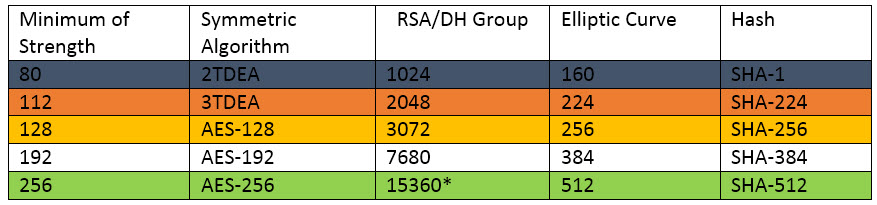
Even if the real AES 256 is used there is no guaranteed that it is used throughout the whole system. Take a look at the Institute of Standard Technologies, USA data (from the NIST Report and Cryptographic Key Length and Cryptoperiod from 2012.):
What does all this mean? It’s quite simple.
In order for the system to be on the AES 256 level, all parameters need to be consistent and on the same level of security. The entire system is as reliable as its weakest link.
For example, if RSA 2048 algorithm is used to change keys or the safekeeping of certificates, the entire system will be working at 112 bit.
Exactly the same way if the Hash function SHA-256 is used then the strength will only be 128 bit, even if the encryption uses AES 256. Actually, that is one of the reasons why you will not find comprehensive information on all crypto algorithms on the sites of manufacturers.
Can be explained even simpler:
If you find any of the parameters of the crypto-system on the black line, the system is easily breakable.
Parameters on the orange line are associated with high risk, yellow – less risk, but you have to keep in mind that the strength will be AES- 128 and not 256.
The white line is quite safe, and the green one is the safest of them all with TOP SECRET strength of protection.
* currently the certification group for 15360 size does not exist, as an alternative NIST recommends to use the certification group 8192.
Proprietary binary communication protocol
Another important difference of our solution – fully proprietary, designed from scratch binary communication protocol.
What is it and why did it in this way?
Many solutions on the communication security market use a common security communication protocol, like: ZRT, SRTP, Secure SIP
Unfortunately the popularity of such protocols have their downsides:
- it is obvious that you are using a connection protection solution, extra attention
- depending on the protocol, there are scheme and method limitations that can be applied
- in the popular protocols vulnerabilities are found on a regular basis, hence at present the weakness is known and how to make use of it is obvious. In this situation the user becomes dependent on how frequent the provider updates the solution ( unfortunately the weakness is exploited first, only after it is published, what is even worse, sometimes the vulnerabilities in the system are kept a secret and are exploited until they are discovered by someone else)
- Usually all mass solutions use such protocols – an extra reason for secret services and other third parties to invest money to break such protocols – once broken they get access to multiple solutions.
- In several countries, solutions based on such protocols will not work (operators will block it), with the exception when it is already known how to break such a solution.
For these very reasons our solution uses it own and not standard fully binary( and not XML basis) encryption protocol.
What does that give you?
- The protocol does not have a specific headline or other ways to identify a specific protocol that is being used( different versions of the protocol are also hard to detect). Since the encryption is used from the very start, for a third party it looks like random binary data.
- Since the protocol is developed by us, for each client who buys out server, a separate(special) version of the protocol can be developed – in this situation, investing resources to break such a system become very hard to justify.
- Furthermore, as a side effect, our solution works very well even with weak communication channels (e.g. SIP based solution does not)
| Our solution | Others |
|
|
Interested? Next step: get free advice from our encrypted communication expert.
In order for you to choose which method is appropriate for you to protect your phone conversations and SMS we offer free security advice.
Choosing the right solution depends on many parameters:
- which channels of communication are being used
- how many offices will be using such a system
- number of users of the encryption network
In some situations a complex multi leveled system has to be used in others a simple solution is sufficient.
We will let you know what type of protection suits you best based on our experience.
You can request a free security advice here:
Tel: +49 335 2288 3873
Skype: fivepro.customer.care
Monday-Friday 10:00 – 18:00 CET
Email:
info@secure-voice.com